






AI can write code now, and many families are asking the same thing: does my kid still need to learn coding? Our calm answer is yes. Not to type faster than an AI, but to know whether the code it hands back is actually right. Here is one small Halloween example that shows the difference.
Try this before you read on
Look at the one line of AI code below and ask your child: on September 30, how many days are left until Halloween? Write the answer on paper first. Then see what the code says.
The case: an AI-written Halloween countdown
Say your kid wants a "days until Halloween" countdown on the kitchen tablet and asks an AI helper to write it. The code comes back in seconds:
from datetime import date
today = date.today()
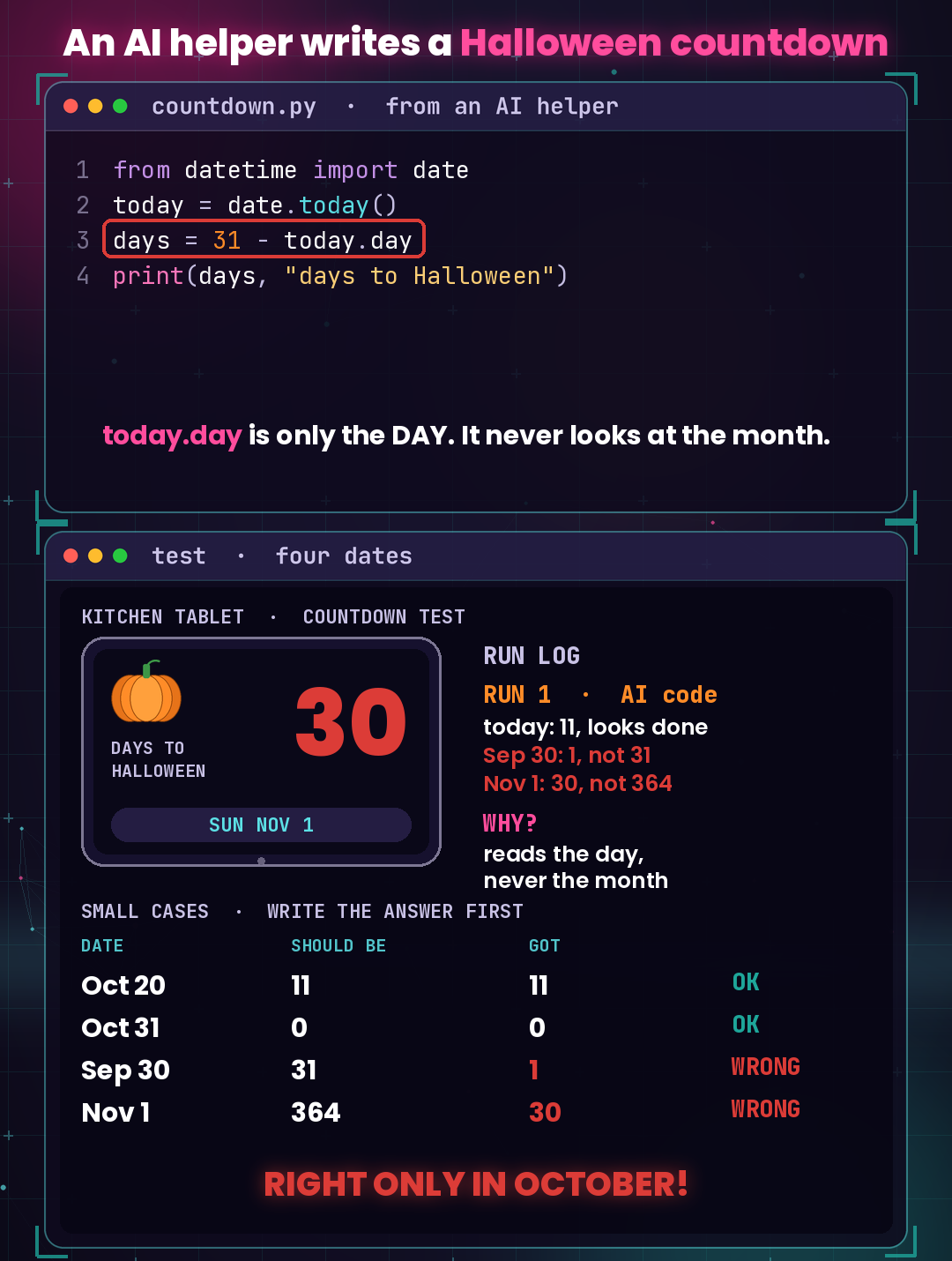
days = 31 - today.day
print(days, "days to Halloween")
The key line is days = 31 - today.day: 31 minus today's day number. We built this example ourselves for a short video; it is not a real third-party project. On Tuesday, October 20 it showed 11 days, which is right. It looks done.
Where it broke: test small cases, answer first
Before trusting it, pick a few dates, write down what the answer should be, then run the code for each one:
- Oct 20: should be 11, the code shows 11. Right.
- Oct 31: should be 0, the code shows 0. Right.
- Sep 30: should be 31, the code shows 1. Wrong.
- Nov 1: should be 364, the code shows 30. Wrong.
A pattern appears: the code is right only in October. Why? today.day reads only the day of the month, never the month. On September 30 it simply works out 31 − 30 = 1. On November 1 it works out 31 − 1 = 30. Inside October that shortcut happens to match; outside October it falls apart. Nothing crashed and there was no error message. The program just gave a confident wrong number, and only testing caught it.
The fix: change one idea, then test again from the start
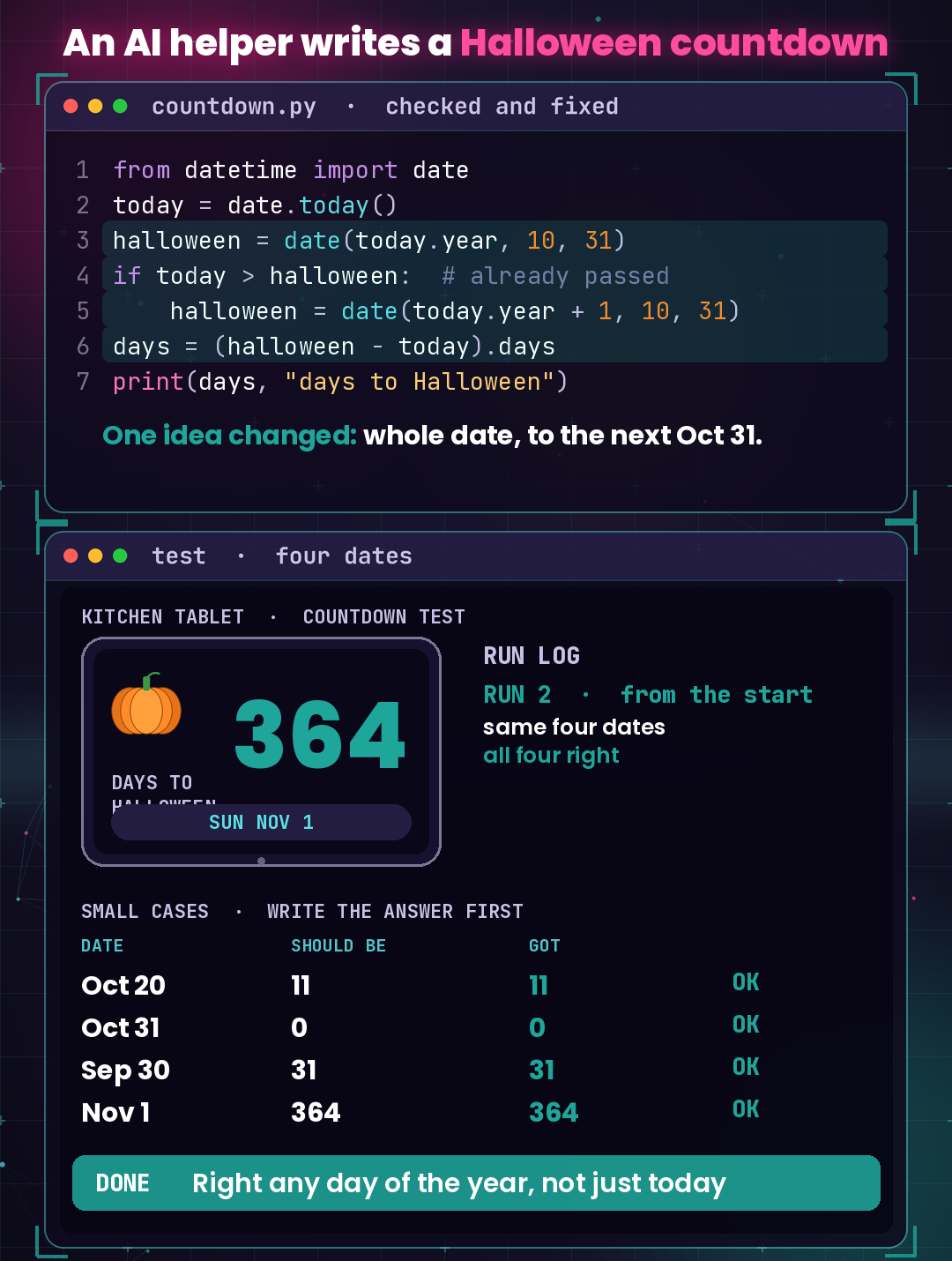
The fix is one idea, not one keystroke: use the whole date, and count to the next October 31 (next year's, if this year's has already passed). In Python, line 3 becomes four lines:
from datetime import date
today = date.today()
halloween = date(today.year, 10, 31)
if today > halloween:  # already passed
    halloween = date(today.year + 1, 10, 31)
days = (halloween - today).days
print(days, "days to Halloween")
In plain words: line 3 sets Halloween for this year. Lines 4 and 5 say "if it has already passed, use next year's." Line 6 subtracts the two full dates, so the month counts too.
Then test again, from the start, with the same four dates: 11, 0, 31, 364. All four are right. Two more details are worth noticing. On October 31 the answer is 0, so the countdown could say "Today!" instead. And on November 1, 2027 the answer is 365, not 364, because a leap day (February 29, 2028) falls in between. The whole-date version handles that by itself.
A Python loop can check every test date at once:
from datetime import date

def days_left(today):
    halloween = date(today.year, 10, 31)
    if today > halloween:  # already passed
        halloween = date(today.year + 1, 10, 31)
    return (halloween - today).days

for m, d in [(10, 20), (10, 31), (9, 30), (11, 1)]:
    print(m, d, days_left(date(2026, m, d)))
It prints:
10 20 11
10 31 0
9 30 31
11 1 364
We re-ran every number on this page in Python before publishing.
What your kid still learns: computational thinking
AI can help write the code. Checking it is your kid's part, and that is where the four skills of computational thinking come in:
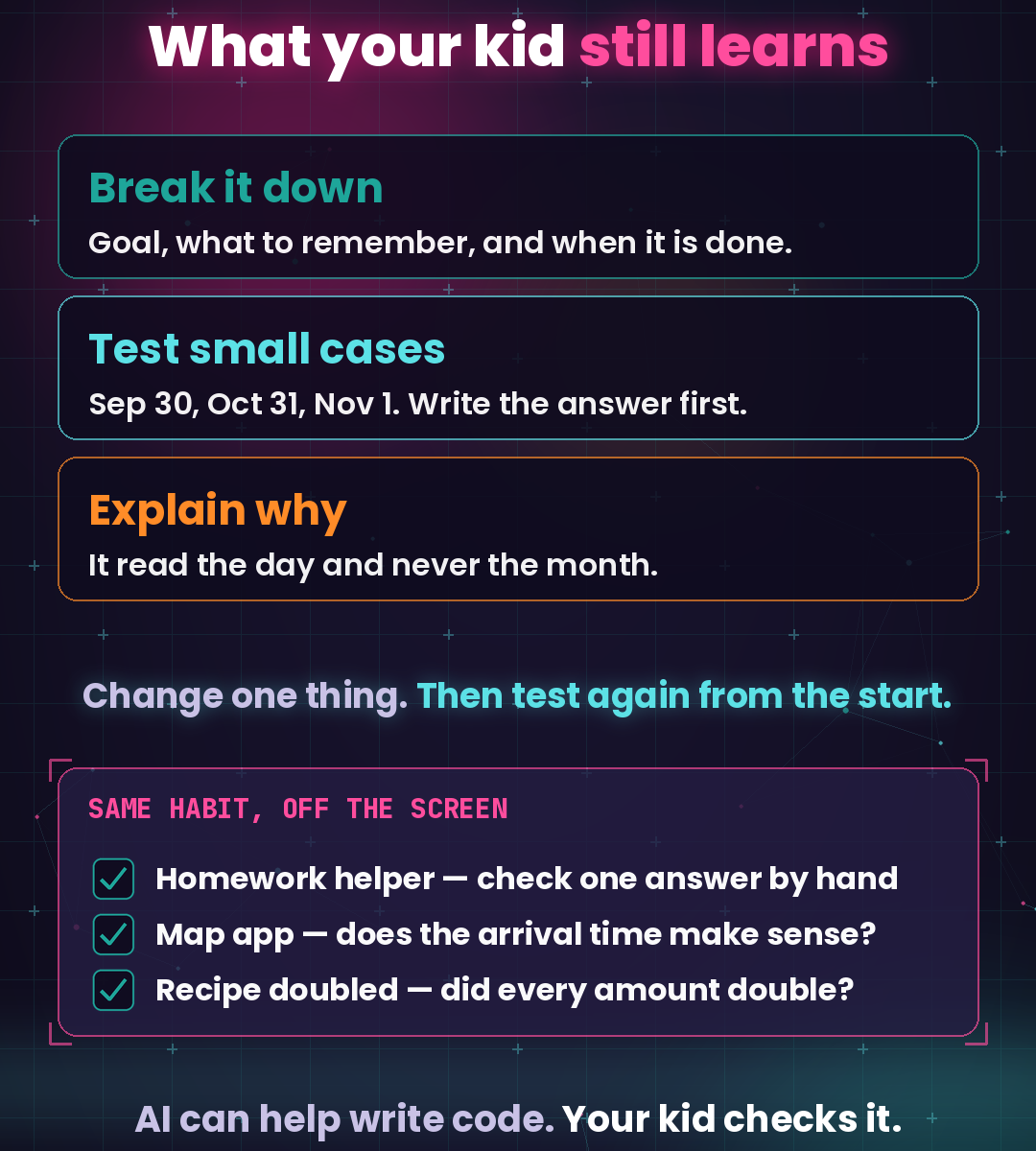
- Decomposition: before writing anything, break the job into four questions. Goal: show the days until Halloween on any day of the year. Remember: the full date matters, month and day, and Halloween may be this year's or next year's. Done when: Oct 20 shows 11, Sep 30 shows 31, Nov 1 shows 364. Edge cases: Oct 31 is 0, the day after Halloween counts to next year, and leap years add a day.
- Pattern recognition: two right answers and two wrong ones line up into one clear pattern: right only in October. Spotting that is what points straight to the cause.
- Abstraction: the bug came from looking at only one part of the date, the day. The fix treats the date as one whole thing, so the program no longer cares which month it is.
- Algorithms: a short, clear set of steps: set this year's Halloween, move it to next year if it has passed, subtract. And the testing habit that goes with it: write the answer first, run, compare, change one thing, then test again from the start, including the edge cases.
In class we often remind kids: write the answer on paper first, then run the code. The same habit works off the screen too: check one homework answer by hand, ask whether the map app's arrival time makes sense, and when a recipe is doubled, check that every amount doubled.
The path from here is gentle: Python first, where one loop tests every date; then JavaScript, to put the countdown on a web page the family can open; and later C++, for speed and bigger problems.
Try it at home
Three steps you can use today:
- Pick three dates: before Halloween, on Halloween, and after it. Write down the answer for each one first.
- Run the program and compare. If an answer is different, ask why.
- Change one thing only, then test again from the start.
If your child likes figuring out why a program gives the answer it does, come meet us. CodeSky runs after-school coding classes in Markham, from Scratch to Python, one small, checkable program at a time. Book a free Python trial class for ages 10–14 (by October 31, 2026) at CodeSky, 9833 Markham Rd Unit 2, Markham, ON L6E 0E5, or email info@codesky.ca.